Antivirus Techniques
-
Antivirus scanning engine uses antivirus signature databases to identify malicious code
-
Signature databases are updated in real time by FortiGuard antivirus service
-
Antivirus scanning techniques:
- Antivirus scan
- Fastest scan, signatures
- Grayware scan
- Unwanted applications
- AI scan
- Detects 0day malware in pe files
- Antivirus scan
-
FortiGate uses several industry-standard techniques for antivirus protection
- Signature-based detection
- Virus outbreak prevention
- External malware block list
- EMS threat feed
- Content disarm and reconstruction (CDR)
- Behavior-based detection
- CIFS scanning
- AI/ML, behavioral, and human analysis
-
Security Profiles -> AntiVirus
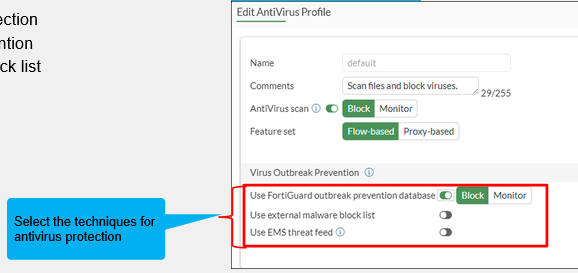
Note: this protection essentially hashes files and compares hash with FortiGuard. This requires a license.
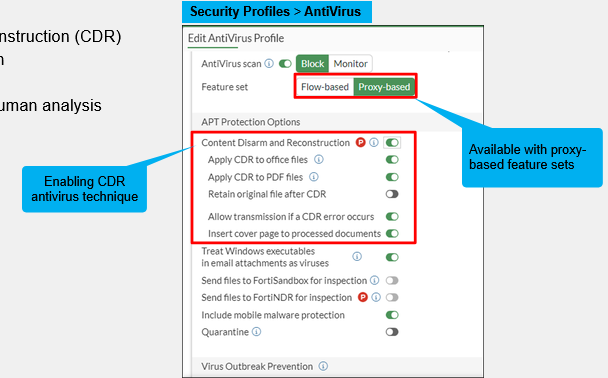
Note: Using any type of CDR requires proxy-based malware scanning
Inspection Modes
Available inspection modes:
-
Flow-based inspection
- Default inspection mode
-
Proxy-based inspection
- Provides additional options
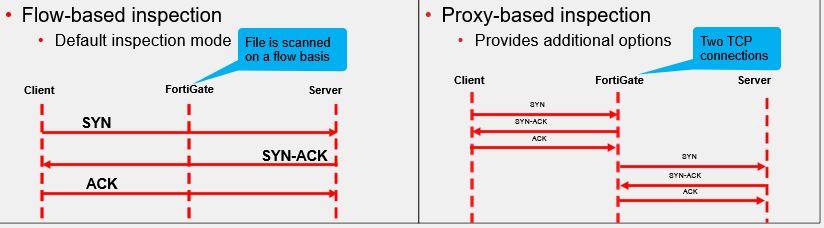
If security is priority: proxy-based inspection If performance is priority: flow-based inspection
Flow-Based Inspection Mode Packet Flow
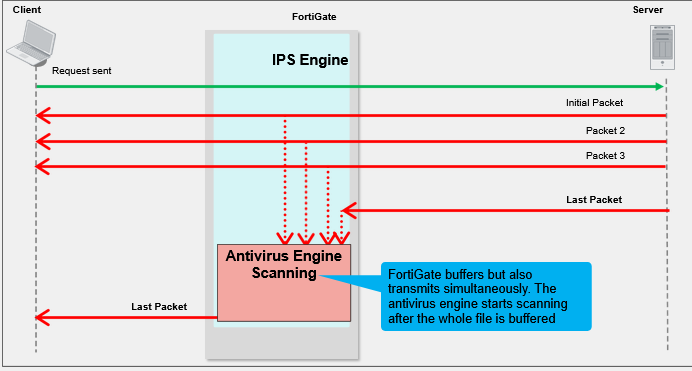
Flow-Based Inspection Mode
-
Default Mode
-
Security Profiles
-
Set protocols to be scanned
- HTTP, SMTP, POP3, IMAP, FTP, CIFS
-
Policy & Objects -> Firewall Policy
- Set desired inspection mode (flow-based, proxy-based)
- Enable AV Security Profile
- Select wanted profile
Stream-Based Antivirus Scanning in Flow-Based Inspection
-
Scanning for HTML and JavaScript files with antivirus engine 7.0
-
Eliminates the need to cache entire file
-
Improves memory usage
-
FortiGate will not user stream-based scanning if any of the followinng antivirus scanning configurations or features are enabled:
- ML-based malware detection
- Extreme antivirus database
- Greyware scan
- Mobile malware database
- External block list
- EMS threat feed
- FortiGuard outbreak prevention
- DLP
- File filter
-
Flow-based inspection mode
- Pattern matching can be offloaded to CP8 or CP9
- Priority on traffic throughput
Proxy Inspection Mode Packet Flow
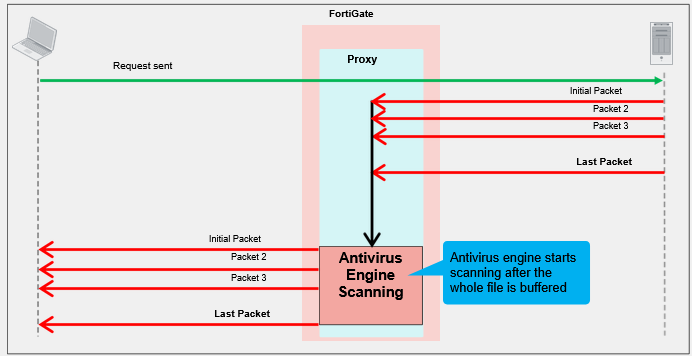
Proxy Inspection Mode Enabled
- Configure the antivirus profile
- Feature set is proxy based
- Provides additional antivirus support
- MAPI and SSH protocol inspection
- CDR
- FortiNDR inspection
Note: Requires >2gb RAM
Stream-Based Antivirus Scanning in Proxy-Based Inspection
- Default scan mode in proxy mode
- Supports ZIP, GZIP, BZIP2, TAR, and ISO (ISO 9660) archive file types
- Supports HTTP(S), FTP(S), and SCP/SFTP protocols
- Inspects the contents of large archive files without buffering the entire file
- Decompresses and scans large archive files
- Identifies file types quickly
- Detects viruses effectively
- Can be disabled through the CLI
config antivirus profile
	edit <profile-name>
		set feature-set proxy
		set scan-mode { default* | legacy }
	next
end
- Proxy-based inspection mode
- Required for its additional optios
- Priority on network security
Antivirus Block Page
- Information available on the antivirus block page
- Contains filename, virus name, website host or URL, link to FortiGuard Encyclopedia
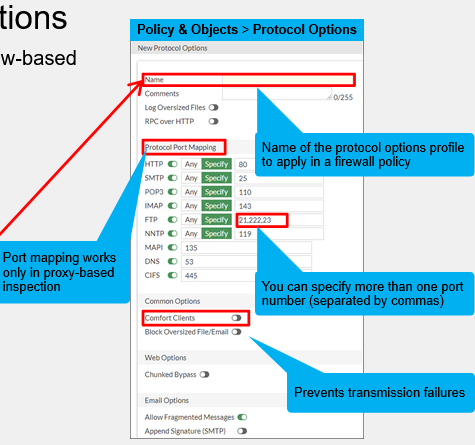
Configuring Protocol Options
-
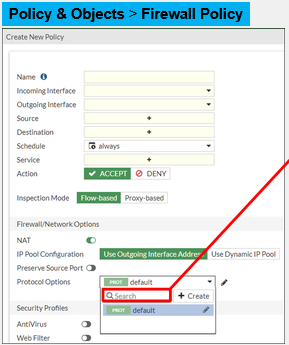
Available for both proxy-based and flow-based firewall policies
-
Policy & Objects -> Firewall Policy
-
Policy & Objects -> Protocol Options
Protocol Options - Large Files
- By default, files that are bigger than the oversize limit are bypassed from scanning
- You can modify this behavior for all protocols
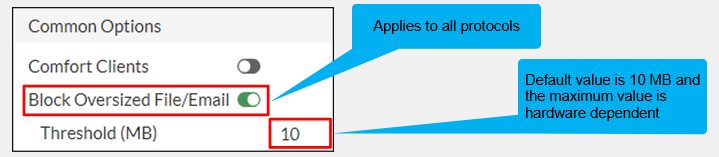
- You can enable logging of oversize files and adjust settings per protocol using the CLI
config firewall profile-protocol-options
	edit <profile-name>
		set oversize-log { enable | disable }
		config <protocol-name}
			set options oversize
			set oversize-limit <integer>
		end
	end
end
Protocol Options - Compressed Files
- Archives are unpacked and files and archives within are scanned separately
- Password-protected archives cannot be decompressed
- Increasing the limits impacts memory usage
config firewall profile-protocol-options
	edit <profile-name>
		config <protocol-name>
			set uncompressed-oversize-limit [1-<model-limit>]
			set uncompressed-nest-limit [1-<model-limit>]
		end
	end
end
Antivirus Logs
- Log & Report -> Security Events -> Antivirus
Forward Traffic Logs
- Log & Report -> Forward Traffic
- Select log, press details -> Security
Security Dashboard
- Security widget and dashboard allow you to monitor your network
- Dashboard -> Security
Drill Downgives more details ? weird.
Troubleshooting Common Antivirus Issues
-
Verify FortiGuard antivirus license
- System -> FortiGuard
-
Force FortiGuard to check for new antivirus updates
execute update-av
- Run the real-time update debug to isolate update-related issues
diagnose debug application update -1
diagnose debug enable
execute update-av
-
Unable to detect viruses even with a valid contract?
- Check firewall policy configuration
- Verify port mapping if in proxy-based inspection
- Verify the AV profile is applied
- Verify deep-inspection is on for encrypted protocols
-
Check useful antivirus commands
checks for amount of viruses caught in one minute:
get system performance status
checks antivirus database information
diagnose antivirus database-info
checks version information
diagnose autoupdate versions
displays scan times for infected files
diagnose antivirus test "get scantime"