What is IP Routing
- FortiGate acts as an IP router in network address translation (NAT) mode
- Forwards packets between IP networks
- Supports IPv4 and IPv6 routing
- IP routing:
- Performed for firewall traffic and local-out traffic
- Local out is traffic originating from the FortiGate
- Determines next hop (outgoing interface and gateway) for packet destination address
- Next hop can be the destination router or another router along the path
- Performed for firewall traffic and local-out traffic
- Routing table:
- Contains routes with next-hop information for a destination
- Entries are checked during route lookup (best route selection)
- Best route: most specific route to the destination
- Duplicate routes: Multiple routes to the same destination
- Route attributes are used as tiebreakers for best route selection
- Routing precedes most security actions
- Configure your security policies based on routing settings, not the opposite
Route Lookup
- For any session, FortiGate performs a route lookup twice:
- For the first packet sent by the originator
- For the first reply packet coming from the responder
- Routing information is written to the session table
- All other packets for that session will use the same path
- No more route lookups done unless the session is impacted by a routing change
- Route information on the sessions is flushed and new route lookups are performed
RIB and FIB
-
FortiGate maintains two tables containing routing information: RIB and FIB
-
RIB
- Standard routing table containing active (or best) connected, static, and dynamic routes
- Visible from the GUI and CLI
-
FIB
- Routing table from a kernel perspective
- Composed mostly of RIB entries, plus some system-specific entries
- Used for route lookups
- Visible from the CLI with the command
get router info kernel
Route Lookup Process
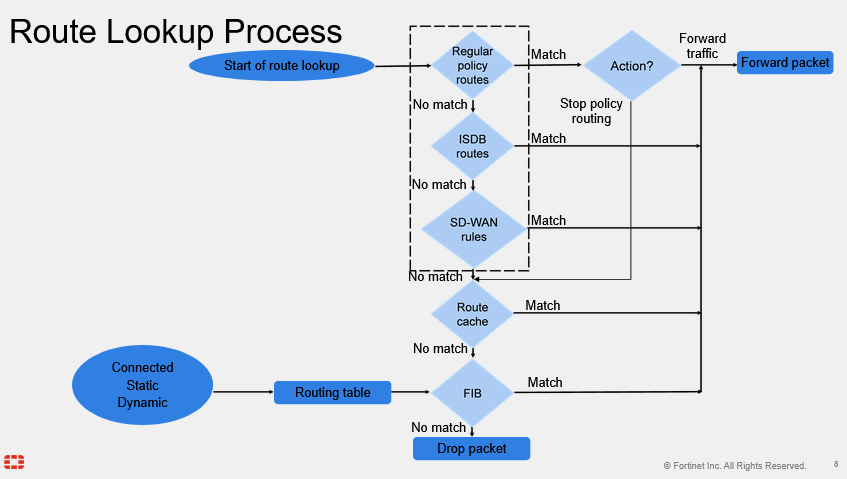
Static Routes
- Configured manually, by an administrator
- Simple matching of packets to a route, based on the packet destination IP address
- Network -> Static Routes
Static Routes with Named Addresses
- Firewall addresses set to type Subnet or FQDN can be used as destinations for static routes
Internet Services Routing
- Route well-known internet services through specific interfaces
- Policy & Objects -> Internet Service Database
- (Database containing IP addresses, protocols, and ports used by common internet services)
- Network -> Static Routes
- Set a destination as an internet service and specify an egress port
Routing Monitor
- Routing table (Static & Dynamic) view
- Contains best routes (active routes):
- Connected, static, and dynamic routes
- Doesn't contain:
- Inactive, standby, and policy routes
- Contains best routes (active routes):
- Dashboard -> Network -> Static & Dynamic Routing
Routing Attributes
- Each route in the routing table has the following attributes:
- Network
- Gateway IP
- Interfaces
- Distance
- Metric
- Priority
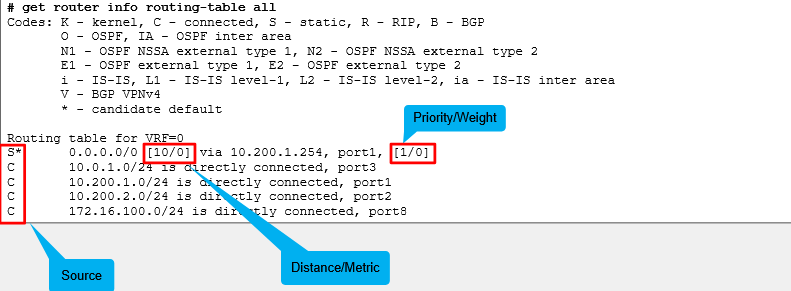
get router info routing-table all
Distance
-
First tiebreaker for duplicate routes (best route selection)
- The lower the distance, the higher the preference
- Set by the administrator (except the connected routes)
-
Best route selection
- Route with lowest distance is installed in the RIB
- Standby routes (higher distance) are not installed in the RIB
- They are installed in the routing table database
-
Avoid multiple equal-distance duplicate routes but different protocol
- FortiGate keeps the route that was learned last
-
Default distance per route type:

Metric
- Tiebreaker for same-protocol duplicate dynamic routes
- The lower the metric, the higher the preference
- Best route is installed in the routing table and other duplicate routes in the routing table database
- The calculation method differs among routing protocols
Priority
- Tiebreaker for static routes with same distance
- All static routes with equal distance are installed in the routing table, even if they have different priorities
- Routes with lower priorities are preferred routes
- Default value: 1
- Best route is used during route lookup
- View in Dashboard -> Network -> Static & Dynamic
- Edit priority in Network -> Static Routes
Routing Table - CLI
get router info routing-table all
GUI Route Lookup Tool
-
Lookup route by:
- Destination address (required)
- Destination port, source address, source port, protocol, and source interface (optional)
-
If all criteria are provided:
- FortiGate checks both routing table and policy route table entries
- Otherwise, FortiGate checks routing table entries only
-
Matching route is highlighted
-
Dashboard -> Network -> Static & Dynamic Routing -> Route Lookup
Reverse Path Forwarding
- IP anti-spoofing protection
- Source IP is checked for a return path
- RPF check is only carried out on:
- The first packet in the session, not on a reply
- Two modes:
- Feasible path (default; formerly loose)
- Return path doesn't have to be the best route
- Strict
- Return path must be the best route
- Feasible path (default; formerly loose)
- If RPF check fails, debug flow shows:
- reverse path check fail, drop
Set RPF mode: (default = disable)
config system settings
	set strict-src-check [disable | enable]
end
Disable RPF (default = enable)
config system interface
	edit <interface>
		set src-check disable
	next
end
ECMP
- Same-protocol routes with equal:
- Destination subnet
- Distance
- Metric
- Priority
- ECMP routes are installed in the RIB
- Traffic is load balanced among routes
ECMP Load Balancing Algorithms
- Source IP (default)
- Sessions sourced from the same address use the same route
- Source-destination IP
- Sessions with the same source and destination address pair use the same route
- Weighted
- Applies to static routes only
- Sessions are distributed based on route, or interface weights
- The higher the weight, the more sessions are routed through the selected route
- Usage (spillover)
- One route is used until the bandwidth threshold is reached, then the next route is used
Configuring ECMP
- If SD-WAN is disabled, the ECMP algorithm is set on the CLI:
config system settings
	set v4-ecmp-mode [source-ip-based | weight-based | usage-based | source-dest-ip-based]
- Configure weight values on the CLI on the interface level (first code blurb) and route lever (second code blurb)
config system interface
	edit <interface name>
		set weight <0-255>
	next
end
config router static
	edit <id>
		set  weight <0-255>
	next
end
- Configure spillover thresholds on the CLI (kbps):
config system interface
	edit <interface-name>
		set spillover-threshold <0-16776000>
		set ingress-spillover-threshold <0-16776000>
	next
end
Default ECMP Algorithm vs. SD-WAN ECMP Algorithm
- Volume algorithm:
- FortiGate tracks the cumulative number of bytes of the member
- The higher the member weight, the higher the target volume, the more traffic is sent to it
