The Modern Context of Network Security
- Firewalls are more than gatekeepers on the network perimeter
- Today's firewalls are designed in response to multifaceted and multidevice envioronments with no identifiable perimeter:
- Mobile workforce
- Partners accessing your network services
- Public and private clouds
- Internet of Things (IoT)
- Operation technology (OT)
- Bring your own device (BYOD)
- Firewalls are expected to perform different functions within a network
- Different deployment nodes
- Distributed enterprise firewall
- Next-generation firewall
- Internal segmentation firewall (ISFW)
- Data-center firewall
- DNS, DHCP, web filter, IPS, etc.
- Different deployment nodes
Factory Default Settings
- IP: 192.168.1.99/24
- Management interface on high-end and mid-range models
- Port1, or internal interface on entry levels
- PING, HTTPS, and SSH protocol management enabled
- Built-in DHCP server enabled on port1 or internal interface
- Only on entry-level models that support DHCP server
- Default login
- User: admin
- Password: (blank)
- Both are case sensitive
- Modify the default (blank) password
- Can access FortiGate on the CLI
- Console: without network
- CLI console widget and terminal emulator, such as PuTTY or Tera Term
Modes of Operation
- NAT mode (default)
- FortiGate is an OSI layer-3 router
- Interfaces have IP addresses
- Packets are routed by IP address
- Transparent mode
- FortiGate is an OSI layer-2 switch or bridge
- Interfaces do NOT have IP addresses
- Cannot route packets, only forward or block
Interface IP Addresses
-
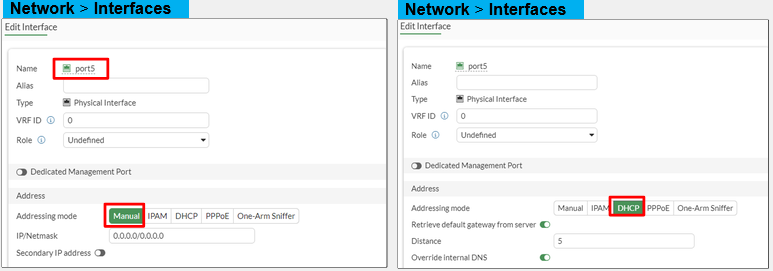
In NAT mode, you can't use interfaces until they have an IP address
- Manually assigned
- Automatic
- DHCP
- PPPoE
-
Network -> Interfaces
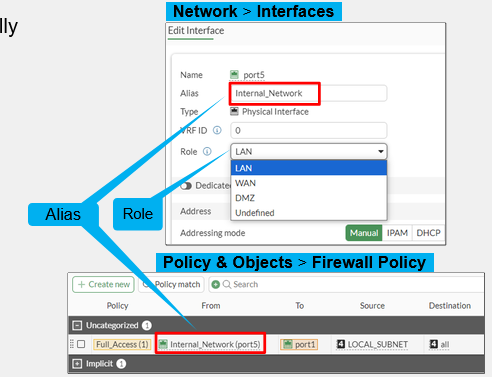
Interface Role Compared to Alias
- Role defines interface settings typically grouped together:
- Prevents accidental misconfiguration
- Four types:
- LAN
- WAN
- DMZ
- Undefined (show all settings)
- Not in a list of policies
- Alias is a friendly descriptor for the interface
- Used in a list of policies to label interfaces by purpose
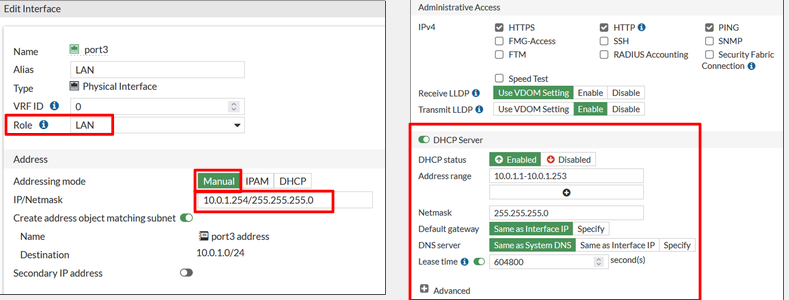
FortiGate as a DHCP Server
- Network -> Interfaces
Static Gateway
- Set a default route or configure a static one
- If the interface is DHCP or PPPoE, the gateway can be set dynamically
- Network -> Static Routes
Administration Methods
- CLI
- Console, SSH, GUI Widget
- API
- Fortinet Developer Network, Ansible, Terraform
- FortiManager
- FGFM Management Protocol
- GUI
- Web Browser (HTTP, HTTPS)
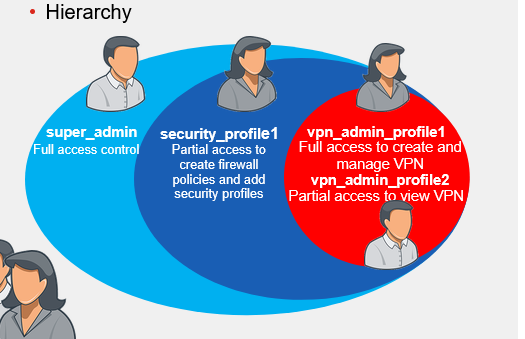
Administrator Profile
- System -> Admin Profiles
- super_admin is full access, encompassing all others
Administrative Access - Trusted Sources
- System -> Administrators
- Gives an authentication user if the admin comes from a different box
Administrative Access - Ports and Password
- Port numbers are customizable
- Fortinet recommends using only secure access (SSH, HTTPS)
- Default Idle Timeout value is 5 minutes
- Setting the minimum password requirements
Administrative Access - Protocols
- Enable acceptable management protocols on each interface independently
- Separate IPv4 and IPv6
- IPv6 options hidden by default
- Other protocols for which FortiGate is the destination IP address:
- Security fabric connection
- CAPWAP
- FortiTelemetry
- FMG-Access
- FTM
- RADIUS Accounting
- Security fabric connection
- LLDP support
- Detecting an upstream Security Fabric FortiGate through LLDP
FortiGuard Subscription Services
- Internet connection and contract required
- Provided by FortiGuard Distribution Network (FDN)
- Major data centers in North America, Asia, and Europe
- Or, from FDN through your FortiManager
- FortiGate prefers the data center in nearest timezone, but will adjust by server load
- Major data centers in North America, Asia, and Europe
- Package updates: FortiGuard antivirus and IPS
- update.fortiguard.net
- TCP port 443 (SSL)
- Live queries: FortiGuard web filtering, DNS filtering, and antispam
- service.fortiguard.net for proprietary protocol on UDP port 53 or port 8888
- securewf.fortiguard.net for HTTPS over fort 443, 53, or 8888
- FortiOS uses FortiGuard server for DNS request
- By default, uses DNS over TLS (DoT) to secure DNS traffic
FortiGuard Licenses
- Can check licenses in System -> FortiGuard
diagnose autoupdate versions
- This will show the databases downloaded onto the device
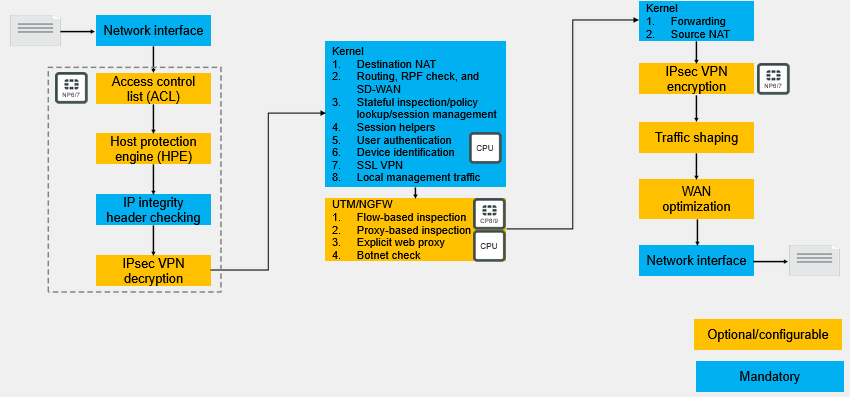
Life of a Packet - Initial Session Packets
Review
- Configure FortiGate using the factory default settings
- Configure FortiGate as the DHCP server
- Configure and control administrator access to FortiGate
- Check and verify FortiGuard licenses
- Describe session packets on FortiGate