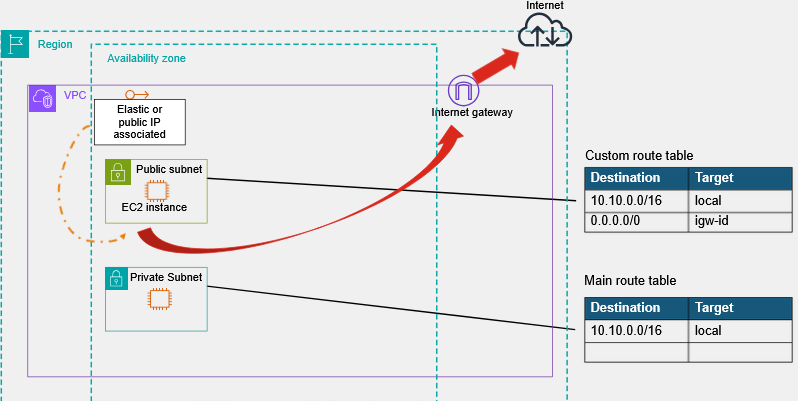
AWS internet gateway - VPC component, comms between devices
Azure NAT Gateway - cloud NAT service. Lets all devices in a private subnet connect to the internet
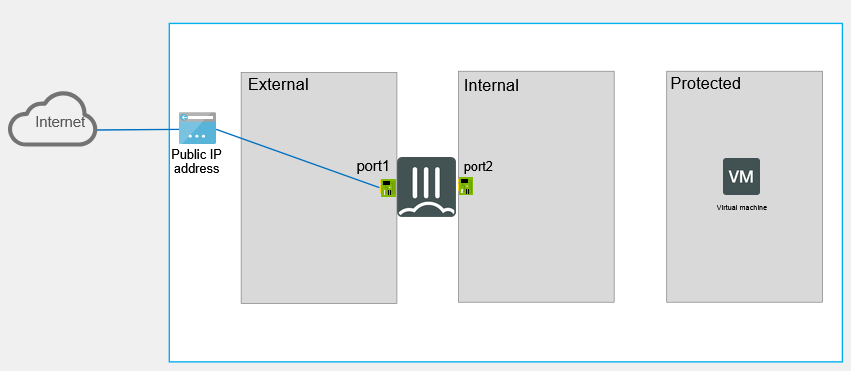
Example Deployment of a Single FortiGate Instance
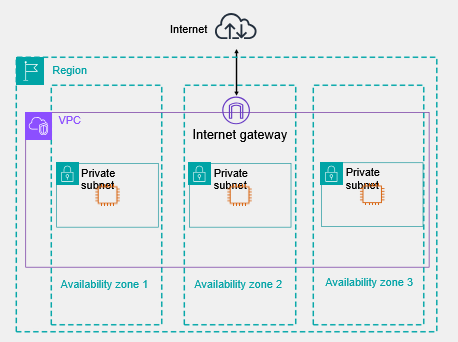
AWS Regions and Availability Zones
AWS Cloud currently stretches across 123 availability zones (AZs) within 39 geographical regions across the globe
One FortiGate cannot sit between AZs
Amazon Virtual Private Cloud
Your own network in the cloud
The base classless interdomain routing (CIDR) is defined here
Allows more than one VPC
Defined within a region
Spans all AZs within the region in which it is defined
Contains subnets, routing, EC2 instances, IP addressing, and so on
Subnets
Contained to one specific AZ
Public: internet gateway connected subnet
Doesn't mean public addressing within the subnet
Private: internal subnet without an internet gateway
They must follow the addressing space defined in the VPC that they belong to
Reserved IP addresses:
First IP address (x.x.x.1) intrinsic router
Second IP address (x.x.x.2) AWS DNS
Third IP address (x.x.x.3) reserved for future use
Intrinsic Router
The Intrinsic router is the automatic internal routing mechanism of a VPC that:
Connects subnets within the VPC
Enables communication between:
EC2 instances
Subnets (public to private)
The routing service works without user managing any physical router
All subnets are connected to an intrinsic router that resides at the VPC level (in all AZs)
It is assigned the first IP address of the subnet
Referred to as the default gateway for the Elastic Network Interface (ENI) of an EC2 instance
Internet Gateway
Allows for communication between instances in your VPC and the internet
Serves two purposes:
Provides a target in your VPC route tables for internet-routable traffic
Performs NAT for instances that have been assigned public IPv4 addresses
To enable communication over the internet, an instance must have a public address, or an elastic IP (EIP) assigned to it
EC2 Components
ENI
A virtual network interface
Attributes (IP/MAC/security group) follow the ENI when it is attached to or detached from an instance
When you move an ENI, network traffic is redirected to the new instance
Each instance in your VPC has a default network interface (the primary network interface) that is assigned a private IPv4 address from the IPv4 address range of your VPC
You cannot detach a primary network interface from an instance
Cannot move between AZs
Source / destination check
Set by the ENI
Allows the source and destination IP addresses that are different from the assigned IP address of the interface
Required on private FortiGate interface when routing traffic to other networks
Elastic IP Addresses
An EIP address is a static, public IPv4 address
You can associate an EIP address with any EC2 instance or ENI for any VPC in your account
You can use an EIP address to mask the failure of an instance by rapidly remapping the address to another instance in your VPC
Associating an EIP address with an ENI instead of directly with the instance allows all attributes of the ENI to move from one instance to another, in a single step
Implicit Router and Internet Gateway
Routing Tables
By default, subnets are associated with the main routing table
You can create more routing tables and explicitly associate them with subnets
A gateway is not defined by an IP address
Instead, it uses the ENI object
EC2 instances always use the intrinsic router as the default gateway but they are then redirected to each gateway defined in the routing table
You can use static or traditional routing within an instance, but automation could be affected
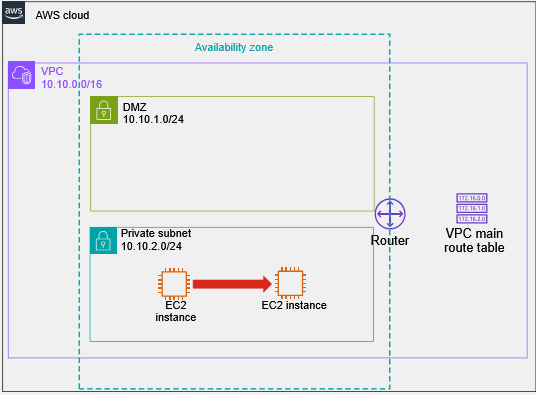
VPC Traffic Flow - Scenario 1
Within a subnet
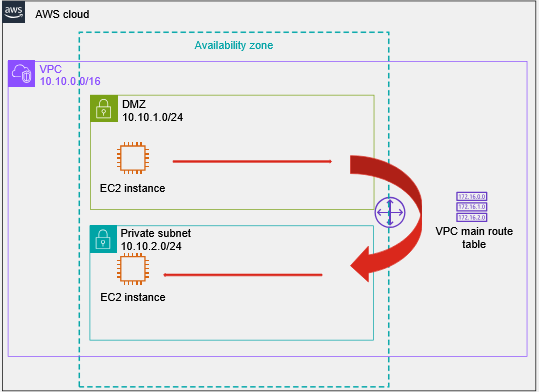
VPC Traffic Flow - Scenario 2
Between subnets in the same virtual network
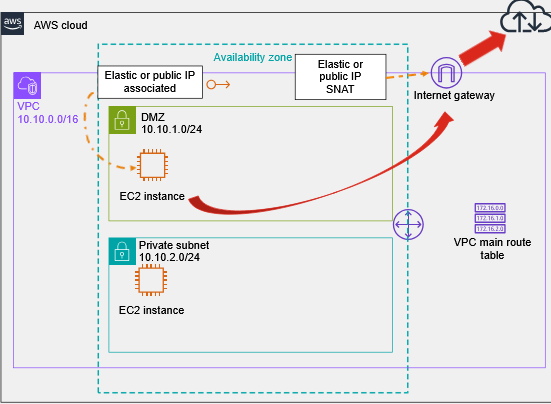
VPC Traffic Flow - Scenario 3
To the internet:
Internet gateway associated with VPC
Route table associated with subnet
Public or elastic IP associated with the ENI of the EC2 instance
VPC Traffic Flow - Scenario 4
From the internet:
Internet gateway associated with VPC
Route table associated with subnet
Public or elastic IP associated with EC2 instance ENI
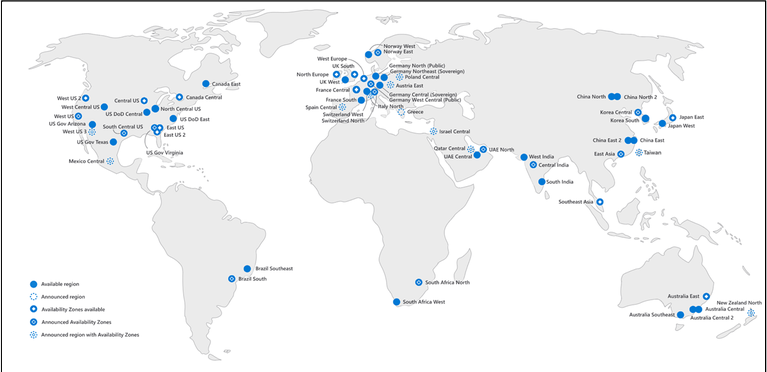
Azure Regions
Azure operates in multiple data centers grouped into geographic regions
Each region has multiple data centers
Create VMs closest to users
Azure Availability Zones
Availability zones help to protect against failures at the datacenter level
Each zone is made up of one or more datacenters equipped with independent power, cooling, and networking
For resiliency, there are a minimum of three separate zones in all enabled regions
The physical and logical separation of availability zones within a region protects applications and data from zone-level failures
Azure VNet
Fundamental component that acts as an organization's network in Microsoft Azure
Allows communication among VMs and to the internet
Layer 3 overlay networks
Contains subnets on the same Azure region
Completely isolated from each other (default)
Must be configured with at least one IP address space
VMs in different subnets within a VNet can route to each other directly
Routing
System routes
By default, Azure creates route tables tat enable resources connected to any subnet in a VNet to communicate with each other
You can implement either or both of the following options to override the system routes Azure creates:
User-defined routes (UDR)
BGP routes
If more than one route has the same prefix, Azure uses the following priorities, in order:
UDR
BGP Routes
System routes
However, the most specific route wins regardless of the route type
10.0.3.0/24 system route takes precedence over a 10.0.0.0/16 BGP route
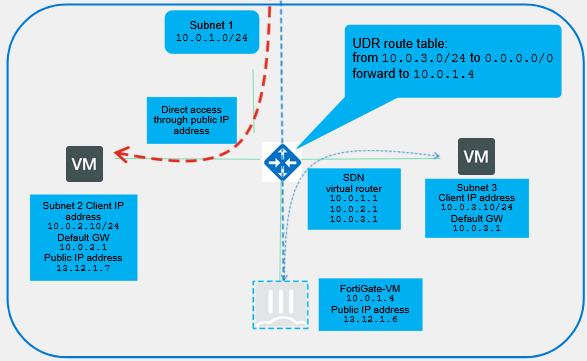
Routing - Azure Example
VM traffic always goes through the SDN virtual router first
To inspect traffic with a FortiGate VM, you must create UDRs
You can associate a public IP address with a VM, so it can access the internet directly, and to give public access to its installed services
Public IP Addresses in Azure
Allow inbound access to Azure resources
Standard SKU:
Static only
Secure by default
Availability zones: non-zonal, zonal, or zone redundant
Routing preference: can minimize the time that traffic spends on the Microsoft network
Global tier: allows public IP addresses to be used with cross-region load balancers
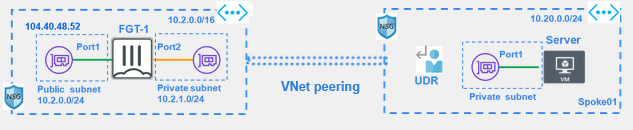
Connecting VNets
You can interconnect VNets to enable resources connected to either VNet to communicate with eachother
Azure offers two main ways to achieve connectivity between VNets
VNet peering
VPN gateways
You can also use third-party resources, like FortiGate VMs, for this purpose
NSGs
Used to lock down access to a subnet or VM
Uses a list of access control rules, that permit or deny traffic based on various criteria
Can be applied either at the NIC level or at the subnet level
Work only if a resource is connected to a VNet - they do not work for other resources (like PaaS services)
Very basic capabilities: layer 4 only
Keep them in mind when configuring and troubleshooting!