What is FortiGate HA?
- Two or more FortiGate devices operate as an HA cluster
- One device is the primary FortiGate
- The primary sends its configuration to others in the cluster
- Sync session info, FIB, FortiGuard definitions, other information
- Not primary is known as a standby
- There are two HA operation modes
- Active Active
- Active Passive
Active-Passive HA
- Operation information is synchronized between FortiGate devices in a cluster
- All secondary devices are on standby
- Only the primary processes traffic
- If the primary fails, a secondary takes over
- This is called an HA failover
Active-Active HA
- All FortiGate devices can process traffic
- The primary can distribute sessions to the secondary devices
- If the primary fails, a secondary takes the session distribution job
HA Requirements
- All members must have the same:
- Model
- Firmware version
- Licensing
- If different, the cluster uses the lowest-level license
- Hard drive configuration
- Operating mode (management VDOM)
- Setup:
- Same HA group ID, group name, password, and heartbeat interface settings
- Identical interfaces on each member must be connected to the same layer 2 network
- Best practice:
- Use at least two heartbeat interfaces
- Initially, switch DHCP and PPPoE interfaces to static configuration
- Example:
config system ha
	set mode a-p
	set group-id 10
	set group-name "Training"
	set password <password>
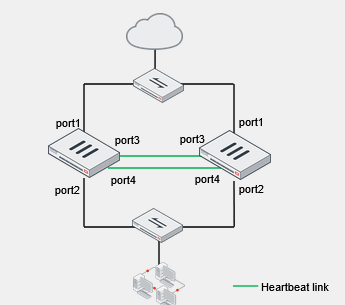
	set hbdev "port3" 10 "port4" 20
end
Note: this sets priority on the heartbeat links, see image below:
Primary FortiGate Election - Override Disabled
- Override disabled (default)
- Force a failover
diagnose sys ha reset-uptime
-
Check the HA uptime difference
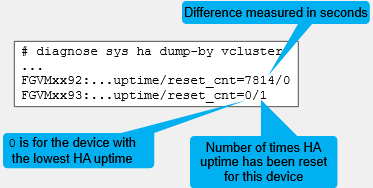
-
Process for negotiating a primary / secondary:
- Connected Monitored ports (greater) -> primary
- HA uptime (greater) -> primary
- Priority (greater) -> primary
- Serial number (greater) -> primary
Primary FortiGate Election - Override Enabled
- Override enabled
config system ha
	set override enable
end
- Force a failover
- Change the HA priority Note: This is the same as preempt on Cisco
Negotiation checks connected monitored ports, priority, uptime, then serial number. So now, priority falls before uptime.
Primary FortiGate Tasks
- Broadcasts hello packets for member discovery and monitoring
- Synchronizes operation-related data such as:
- Configuration (some settings are not synchronized)
- FIB entries
- DHCP leases
- ARP table
- FortiGuard definitions
- IPsec tunnel SAs
- Sessions (must be enabled)
- In active-active mode only:
- Distributes sessions to secondary members
Secondary FortiGate Tasks
- Broadcasts hello packets for member discovery and monitoring
- Synchronizes data from the primary
- Changes made on secondary devices, however, are synced with other members if the cluster is in sync
- Monitors the health of the primary
- If the primary fails, the secondary devices elect a new primary
- In active-active mode only
- Processes traffic distributed by the primary
HA Complete Configuration Synchronization
- New secondary is added to the cluster
- The primary compares its configuration checksum against the new secondary checksum. If it is different, it sends its configuration
HA Incremental Configuration Synchronization
- Primary configuration is changed and changes are synchronized to the secondary
- Secondary configuration is changed and changes are synchronized to the primary
What is not Synchronized?
- These configuration settings are not synchronized between cluster members:
- HA management interface settings
- Default route for the reserved management interface
- In-band HA management interface
- HA override
- HA device priority
- HA virtual cluster priority
- FortiGate host name
- Ping server HA priorities
- The HA priority (ha-priority) setting for a ping server or dead gateway detection configuration
- Licenses
- FortiGuard, FortiCloud activation, and FortiClient licensing
- Cache
- FortiGuard Web Filtering and email filter, web cache, and so on
- GUI dashboard widgets
- HA management interface settings
Failover Protection
- Types:
- Device failover
- The secondary devices stop receiving hello packets from the primary
- Link failover
- The link of one or more monitored interfaces goes down
- Remote link failover
- One or more interfaces are monitored using the link health monitor
- The primary fails if the accumulated penalty of all failed interfaces reaches the configured threshold
- Memory-based failover
- Memory utilization on the primary exceeds the configured threshold and monitoring period
- SSD failover
- FortiOS detects extended filesystem (Ext-fs) errors in an SSD
- Device failover
- Identify failover protection type by looking at:
- Event logs, SNMP traps, and alert email record failover events
- Enable session synchronization for seamless session failover
- Note, this cannot work with deepssl inspection profiles, as it terminates at the FortiGate
Virtual MAC Addresses and Failover
-
On the primary, each interface is assigned a virtual MAC address
- HA heartbeat interfaces are not assigned a virtual MAC address
-
Upon failover, the newly elected primary adopts the same virtual MAC addresses as the former primary
-
After failover, gratuitous ARP informs the network that the virtual MAC address is now reachable through a different FortiGate
Checking the HA Status on the GUI
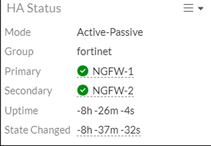
- System -> HA
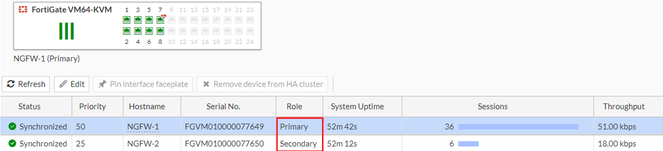
- Dashboard -> Status
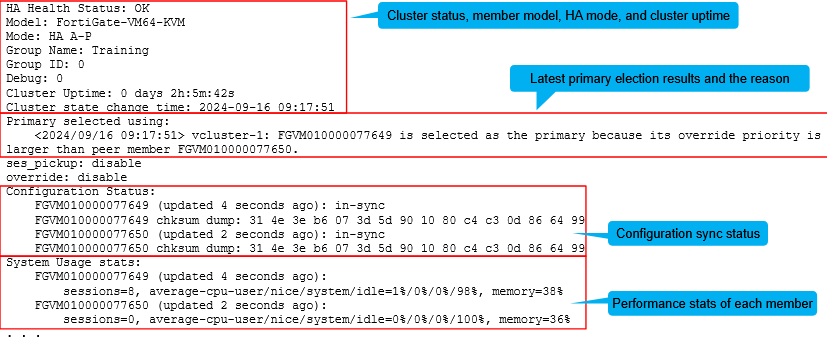
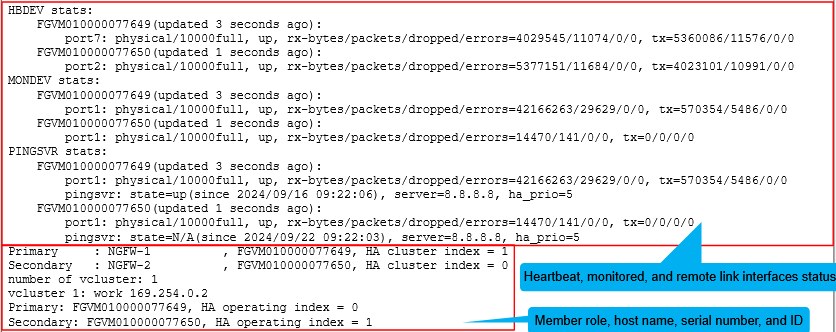
Checking the HA Status on the CLI
get system ha status
Checking the Configuration Synchronization
- Display the member checksum:
diagnose sys ha checksum show
- Display the checksum for all members:
diagnose sys ha checksum cluster
- If the checksums don't match, try running:
diagnose sys ha checksum recalculate
Switching to the CLI of Another Member
- Using the FortiGate CLI, you can connect to the CLI of any member:
execute ha manage <member_id> <admin_username>
- To list the ID of each member, us a question mark:
execute ha manage ?

<id> please input peer box index
<0> subsidary unit FGVM010000077650
Connect to Any Member Directly
-
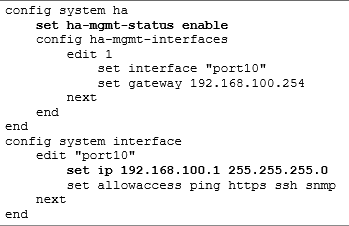
Reserved HA management interface
- Out-of-band
- Up to four dedicated interfaces
- For local-in traffic and some local-out traffic
- Separate routing table
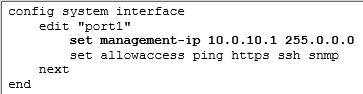
- Configuration example (not synchronized):
-
In-band HA management interface
- In-band
- Use any user-traffic interface
- For local-in and local-out traffic
- Shared routing table
- Configuration example (not synchronized):