What is SD-WAN?
- Software-defined approach to steer WAN traffic using:
- Flexible user-defined rules
- Protocol and service-based traffic matching
- Application-awareness
- Dynamic link selection
- Controls egress traffic
- Flexible user-defined rules
- Secure SD-WAN
- Fortinet SD-WAN implementation (built-in security)
- Benefits:
- Effective WAN use
- Improved application performance
- Cost reduction
SD-WAN Use Cases - Direct Internet Access
- Traffic steered across multiple physical internet links
- Typical operation:
- Critical/sensitive traffic expedited and steered over best performing links
- Costly sinks used for critical traffic or failover
- Static default routing
- Example:
- Two internet links (wan1 and wan2)
- Both steer traffic from the LAN
- Use best-performing link for critical applications
- Use low-cost link for web surfing
SD-WAN Use Cases - Site-to-Site Traffic
- Use overlay links to steer site-to-site corporate traffic
- Overlay: tunnels
- Underlay: physical links
- Typical operation:
- Hub-and-spoke topologies
- Dynamic IPsec tunnels used for overlay
- Dynamic routing
SD-WAN Use Cases - Remote Internet Access
- Internet traffic steered across overlay links to:
- Centralize inspection on hub
- Improve performance if DIA performance is poor
- Provide internet access if DIA is unavailable
- Typical operation:
- Limited inspection on spokes
- Hub performs thorough inspection
- Backup direct internet access
SD-WAN Components
- Members
- Interfaces used to steer traffic
- Logical or physical interfaces
- Zones
- Logical grouping of members
- Optimize configuration
- Performance SLAs
- Performs member health check
- State: alive or dead
- Performance: packet loss, latency, jitter
- SD-WAN Rules
- Define where to steer the traffic
- Traffic matching criteria (src, dst, app, ...)
- Outgoing interface selection strategy
- Performances or members
SD-WAN Rules
-
Describe administrator SD-WAN choices
-
Define steering rules based on:
- Matching traffic criteria
- Member preference
- Define zones to steer traffic to a list of preferred members
- Member performance
- Define criteria SLA members must meet
- Strategy and quality criteria
- Manual, best quality, lowest cost
- Latency, jitter, packet loss
-
Network -> SD-WAN -> SD-WAN Rules
-
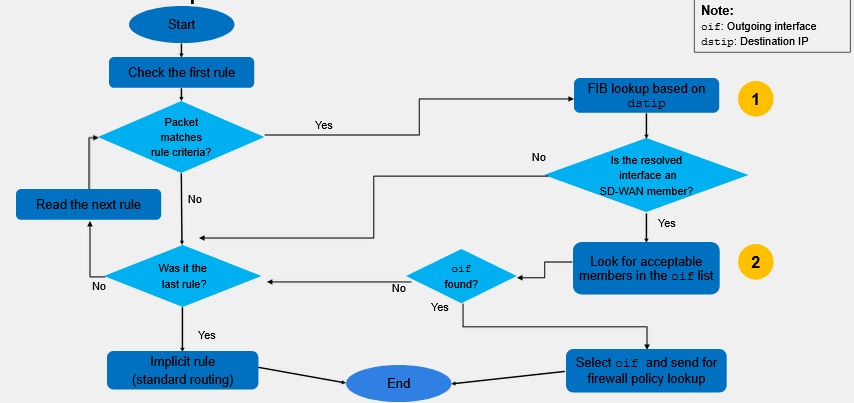
Evaluated in descending order:
- First match applies
- SD-WAN rules are used to steer traffic
- Firewall policy required to allow the traffic
-
Implicit rule
- Always present
- Used if user-defined rules are not matched
- Follow standard routing table
- Traffic is load balanced (default: per source IP)
SD-WAN Members and Zones
-
Members
- Interfaces used to steer traffic
- Can be physical or logical
- Organized in zones
- Interfaces used to steer traffic
-
Zones
- Logical grouping of members
- Optimize configuration and allow for segmentation
- Predefined default zone:
virtual-wan-link
-
Network -> SD-WAN -> SD-WAN Zones
SD-WAN Members - Underlay and Overlay Links
-
Underlay:
- Physical links provided by ISP
- Cable, DSL, fiber, MPLS, 3G/4G/5G/LTE, ATM
- Restricted routing
- No added security
- Physical links provided by ISP
-
Overlay:
- Virtual links built on top of underlay links
- IPsec, GRE, IP-in-IP
- Flexible routing
- Enhanced security
- Virtual links built on top of underlay links
SD-WAN Zones
-
Divides SD-WAN members into groups
- Default zone:
virtual-wan-link- Can't be deleted
- An interface can belong to one zone only
- Default zone:
-
Apply firewall policies on SD-WAN zones
- Perform firewall policies on SD-WAN zones
- Reduces administrative overhead
- Cleaner configuration
-
Usually underlay and overlay links are grouped into different SD-WAN zones
Performance SLAs
- Monitor member health
- State
- Alive or dead
- Performance
- Packet loss, latency, and jitter
- SLA targets
- Minimum performance requirements
- State
- Health can be measured
- Actively
- Based on periodic probes sent to configured servers
- Passively
- Based on member traffic
- Actively
- Use for strategy application
Performance SLA Configuration
-
Network -> SD-WAN -> Performance SLA
-
Probes can be:
- Active: send probes
- Passive: analyze already sent traffic
- Prefer Passive: Use passive, active if no passive traffic
-
Servers show the endpoint we are testing to
-
We can set our SLA targets:
- Latency threshold
- Jitter threshold
- Packet loss threshold
-
Probe interval, number of probes until shown dead
SD-WAN Rules Strategies
- Define
- Requirements for preferred members
- Single or multiple member traffic distribution
- Preferred members
- Best candidates to steer traffic
- Are used only if they have a valid route to the destination
- Member selection
- Manual
- Configuration order preference
- Best Quality
- Best performing member based on quality criteria
- Lowest Cost (SLA)
- Members that meets SLA target (tiebreakers: cost and priority
- Manual
- Network -> SD-WAN -> SD-WAN Rules
SD-WAN Rule Traffic Match Criteria
- Rules can match traffic based on:
- Source
- IP address and interface
- Source interface is a CLI only parameter
- Firewall user and user group
- IP address and interface
- Destination
- IP address
- IP protocol number
- Port range
- Internet service
- Application
- Single application
- Application category
- Group of application
- ToS
- Source
Rule Lookup Process
Firewall Policies with SD-WAN
-
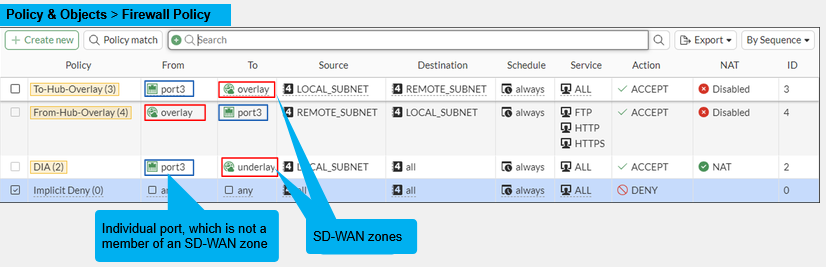
Steered traffic must also be allowed by a firewall policy
-
Reference SD-WAN zones only
- Simplified configuration
-
Can't reference a member directly
-
Policy & Objects -> Firewall Policy
Policy Routes
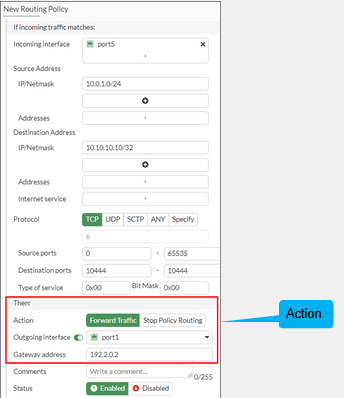
- Provide more granular matching than static routes
- Protocol
- Source address
- Source ports
- Destination ports
- ToS marking
- Destination internet service
- Have precedence over SD-WAN rules and entries in the FIB
- Best practice
- Narrow down matching criteria
- SD-WAN rules are essentially policy routes with additional software defined criteria
Policy Routes - Actions
- Stop Policy Routing
- Skips all policy routes, uses the FIB
- Forward Traffic
- Forwards traffic using the set outgoing interface and gateway
- FIB must have a matching route; otherwise, policy route is considered invalid and skipped
- Network -> Policy Routes
Routing
- Valid route required for steering traffic to members
- Static and dynamic routes supported
- Static routes
- Reference a zone
- Common case, simplified configuration
- Individual ECMP routes installed for each member in the zone
- Gateway obtained from member configuration
- Reference a member
- More granular control
- Reference a zone
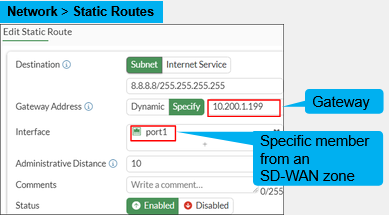
Static Routes Configuration
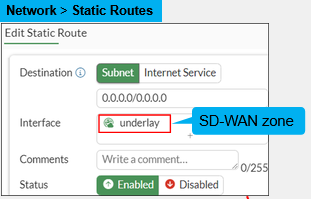
- Static route per SD-WAN zone
- Simplified configuration
- Gateway is retrieved from member settings
- Static route per SD-WAN member
- More granularity
- Gateway not retrieved from member settings
Verify SD-WAN Traffic Routing
- Use the Forward Traffic logs or the pcap tool to verify traffic routing
- There is a column called SD-WAN Rule Name
- Lack of this means it hit implicit
- There is a column called SD-WAN Rule Name
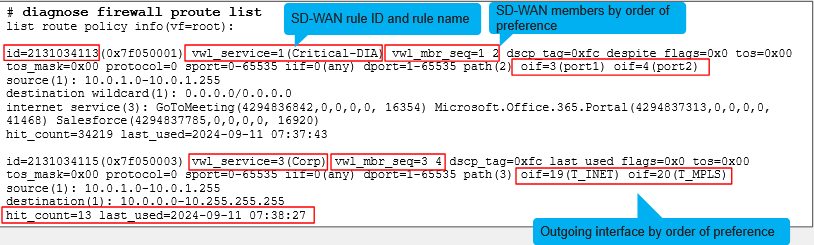
Policy Route Lookup
- SD-WAN fields in proute list
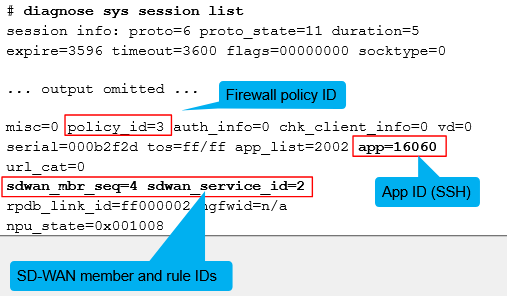
SD-WAN Fields in Session List
- CLI commands:
diagnose sys session filter
diagnose sys session list
diagnose sys session6 list
- SD-WAN information for the session:
sdwan_mbr_seqsdwan_service_id- None if traffic matches default SD-WAN rule
- None if not an SD-WAN session
SD-WAN Monitoring
-
SD-WAN requires regular, or event triggered monitoring
-
SD-WAN specific monitoring tools
- Dashboard widget
- Graphical view on SD-WAN configuration menus
- Traffic distribution
- Rule overview
- Performance graphs of members
- System event log messages for SD-WAN
- Traffic logs with SD-WAN columns
-
Using FortiGate tools:
- IPsec monitoring for overlay tunnels
- Routing table and Proute list
- Session table
- Sniffer traces
Dashboard - Network
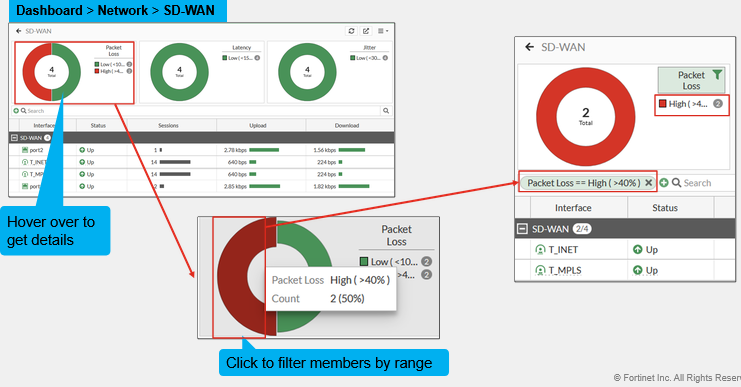
- Network dashboard pane with SD-WAN, routing, and IPsec widgets
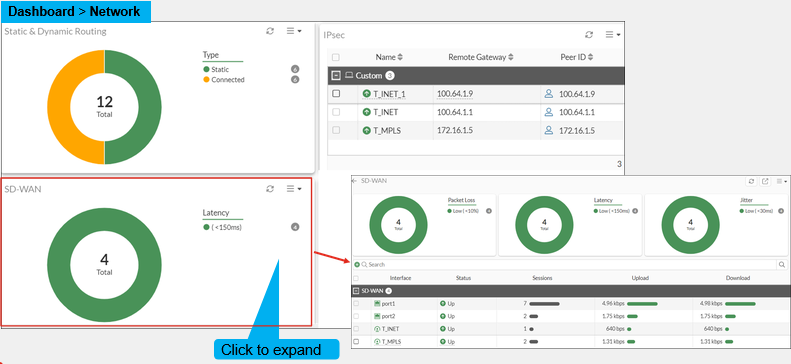
Dashboard - SD-WAN Widget Details
- Consolidated view of member health and utilization
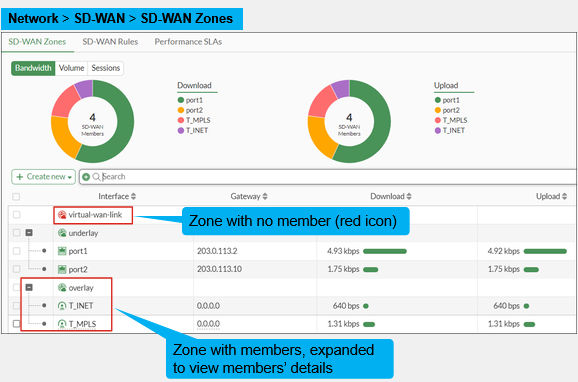
SD-WAN Interfaces and Zones Summary
- Synthetic view of zones and members configuration and status
- Network -> SD-WAN -> SD-WAN Zones
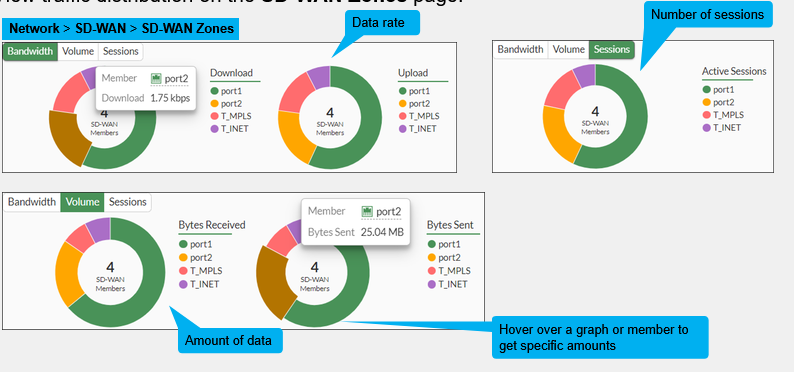
Traffic Distribution
- View traffic distribution on the SD-WAN Zones page:
- Network -> SD-WAN -> SD-WAN Zones
SD-WAN Rules Overview
- Network -> SD-WAN -> SD-WAN Rules
- Summary view of SD-WAN rules
Member State and Performance
- Graphical view of performance SLA measurement over the past 10 minutes
- Network -> SD-WAN -> Performance SLA
System Event Logs
- Event log overview by category
- Log & Report -> System Events -> SD-WAN Events
- Shows the state of members
Traffic Logs
- Enable SD-WAN columns to view SD-WAN-related information
- Log & Report -> Forward Traffic
- Click the gear header to enable more columns