What is IPsec?
- Joins remote hosts and networks together into one private network
- Usually provides:
- Authentication
- Data integrity (tamper proofing)
- Data confidentiality (encryption)
What is the IPsec Protocol?
- Multiple protocols that work together
- Authentication Header (AH) provides integrity, but not encryption
- AH is defined in the RFC, but FortiGate does not use it
- Port numbers and encapsulation vary by network address translation (NAT)
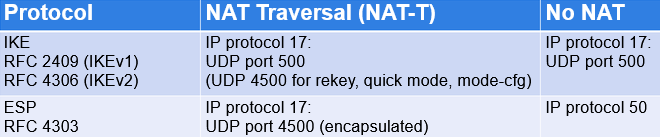
- If required, set a custom port for both IKE and IKE NAT-T (initiator and responder)*:
config system settings
	set ike-port <port>
end
Custom port range is 1024-65535. FortiGate always listens on UDP/4500 (responder only)
How Does IPsec Work?
- Encapsulation
- Other protocols wrapped inside IPsec
- What's inside? Varies by mode:
- Transport mode - TCP/UDP
- Tunnel mode - additional IP layer, then TCP/UDP
- Negotiation
- Authentication
- Handshake to exchange keys, settings
ESP Encapsulation - Tunnel or Transport Mode
- No VPN:
Original IP Header - TCP/UDP Data
- Tunnel Mode:
New IP Header - ESP Header - Original IP Header - TCP/UDP Data - ESP Trailer - ESP HMAC
- Transport Mode:
Original IP Hedaer - ESP Header - TCP/UDP Data - ESP trailer - ESP HMAC
What is IKE?
-
Default ports: UDP/500 (and UDP/4500 when crossing NAT)
-
Negotiates a tunnel's private keys, authentication, and encryption
-
Phases:
- Phase 1
- Phase 2
-
Versions
- IKEv1 (legacy, wider adoption)
- IKEv2 (new, simpler operation)
IKEv1 vs. IKEv2
| Feature | IKEv1 | IKEv2 |
|---|---|---|
| Exchange Modes | - Main: total messages 9 (6 for phase 1, 3 phase 2)<br>- Aggressive: total messages 6 (3 for phase 1, 3 phase 2) | - One exchange procedure only<br>- Total messages: 4 (one child SA only) |
| Authentication Methods | Symmetric:<br>- Pre-shared key (PSK)<br>- Certificate signature<br>- Extended authentication (XAuth) | Asymmetric:<br>- PSK<br>- Certificate signature<br>- EAP (pass-through, no client support) |
| NAT-T | Supported as extension | Native support |
| Reliability | Unreliable - messages are not ackd | Reliable - messages are ackd |
| Dial-up Phase 1 Matching by ID | - Peer ID + Aggressive mode + PSK<br>- Peer ID + main mode + certificate signature | - Peer ID<br>- Network ID |
| Traffic Selector Narrowing | Not supported | Supported |
Negotiation - Security Association (SA)
-
IKE allows the parties involved in a transaction to set up their Security Associations (SA)
- SAs are the basis for building security functions into IPsec
- In normal two-way traffic, the exchange is secured by a pair of SAs
- IPsec administrators decide the encryption and authentication algorithms that can be used in the exchange
-
IKE uses two distinct phases:
- Phase 1 -> Outcome: IKE SA
- Phase 2 -> Outcome: IPsec SA
VPN Topologies - Remote Access
- Remote users connect to corporate resources
- FortiGate is configured as dial-up server. Only clients can initiate the VPN
- Users require a VPN client, such as FortiClient
VPN Topologies - Site-to-Site
Simple: Branch Office - Internet - Headquarters
Hub and Spoke: Headquarters - Branch office 1 Headquarters - Branch office 2 Headquarters - Branch office 3 Headquarters - Branch office 4
Our VPN topologies can also be full mesh or partial mesh.
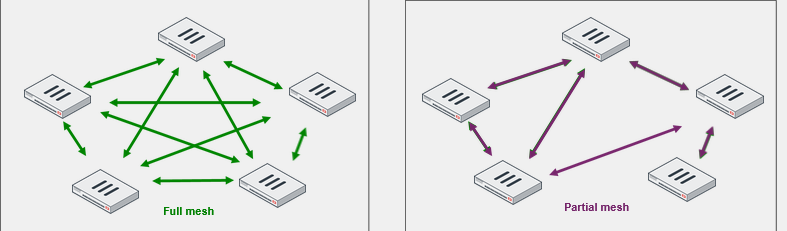
VPN Topologies - Comparison
| Hub-and-Spoke | Partial Mesh | Full Mesh |
|---|---|---|
| Easy Configuration | Moderate Configuration | Complex Configuration |
| Few Tunnels | Medium number tunnels | Many tunnels |
| High central bandwidth | Medium bandwidth in hub sites | Low bandwidth |
| Not fault tolerant | Some fault tolerance | Fault tolerant |
| Low system reqs, higher for center | Medium system reqs | High system reqs |
| Scalable | Somewhat scalable | Difficult to scale |
| No direct comms between spokes | Direct comms between some | Direct comms between all |
IPsec Wizard
- VPN -> IPsec Wizard
- Select a template for the VPN
- The wizard will ask for subnets, interfaces, authentication, etc
Using the IPsec Wizard for a FortiClient VPN
- Simplifies IPsec configuration for a FortiClient VPN
- Must configure options for the remote endpoint, VPN tunnel, and local FortiGate
Phase 1 - Overview
- Each peer of the tunnel - the initiator and the responder - connects and begins to set up the VPN
- On the first connection, the channel is not secure
- Unencrypted keys can be intercepted
- To exchange sensitive private keys, both peers create a secure channel
- Both peers negotiate the real keys for the tunnel later
Phase 1 - How it Works
- Authenticate peers
- PSK or digital signature
- XAuth
- Negotiate one bidirectional SA (called IKE SA)
- In IKEv1, two possible ways:
- Main mode
- Aggressive mode
- Not the same as IPsec SA
- Encrypted tunnel for Diffie-Hellman (DH)
- In IKEv1, two possible ways:
- DH exchange for secret keys
Phase 1 - Network
The following fields must be configured:
- IP version
- Remote gateway
- Static IP address, Dialup user, or Dynamic DNS
- Local Gateway
- Enable if the interface where the tunnel interface terminates has several IP addresses
- Mode config
- Covered more later
- NAT traversal
- Covered more later
- Keepalive frequency
- Dead Peer Detection
- Used to detect dead tunnels
- Forward Error Correction (FEC)
- Technique to reduce number of retransmissions over noisy tunnels, takes more bandwidth
- Advanced
- Add route
- Disable if using a dynamic routing protocol over IPsec and don't want static routes
- Auto discovery sender
- Enable for ADVPN from hubs to spoke. AKA shortcut
- Auto discovery receiver
- Enable on spoke if spoke is to negotiate ADVPN
- Exchange interface IP
- Device creation
- Instruct FortiOS to create an object for
- Aggregate member
- Aggregate multiple VPN tunnels into a single interface
- Add route
Phase 1 - Network - Remote Gateway
Dial-up user
- Two roles: dial-up server and client
- Dial-up server doesn't know client address
- Dial-up client is always the initiator
- VPN peers:
- FortiGate to FortiClient (or third party client)
- FortiGate to FortiGate (or third-party gateway)
Static IP address/dynamic DNS
- Dynamic DNS uses FQDN
- The address of the remote peer is known
- Local peer can be initiator or responder
- VPN peers:
- FortiGate to FortiGate (or third-party gateway)
Phase 1 - Network - IKE Mode Config
- Like DHCP, automatically configres VPN clients' virtual network settings
- By default, FortiClient VPNs use it to retrieve their VPN IP address settings from FortiGate
- You must enable Mode Config on both peers
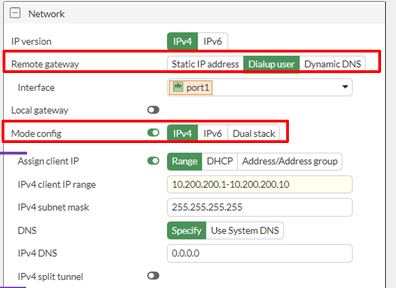 Note: this is only available with dialup users (remote VPN)
Phase 1 - Network - NAT Traversal (NAT-T)
- ESP can't support NAT because it has no port numbers
- If NAT Traversal is set to Enable, it detects whether NAT devices exist on teh path
- If yes, both ESP and IKE use UDP 4500
- Recommended if the initiator or responder is behind NAT
- If NAT Traversal is set to Forced:
- ESP and IKE always use UDP port 4500, even when there are no NAT devices on the path
- Keepalive probes are sent frequently to keep the connection across the routers active
Phase 1 - Network - Dead Peer Detection (DPD)
- Mechanism to detect a dead tunnel
- Useful in redundant VPNs, where multiple paths are available
- Three modes:
- On Demand: DPD probes are sent when there is no inbound traffic
- On Idle: DPD probes are sent when there is no traffic
- Disabled: only reply to DPD probes - don't send probes
Phase 1 - Authentication
- Method
- PSK or Signature
- PSK must match on both sides
- Signature is based on digital certificates. Need local peer cert and CA cert that issued local peer cert
- Version
- Version 1 or Version 2
- Note, version 2 does not have aggressive or main mode
Phase 1 - Authentication - Modes
Aggressive:
- Not as secure as main mode
- Faster negotiation (three packets exchanged)
- Required when peer ID check is needed
Main:
- More secure
- Slower negotiation (six packets exchanged)
- Often used when peer ID check is not needed
Main is more secure, aggressive is faster
Phase 1 - Phase 1 Proposal
-
This section allows us to enable different proposals for the phase 1 SA
-
We can combine different parameters to suit our needs
-
Select an algorithm for encryption
-
Select an algorithm for authentication
-
Select Diffie-Hellman groups
- Must select at least 1. Higher is more secure, but also results in longer compute
-
Key lifetime
- Lifetime of IKE SA
- New key must be made after this time
-
Type in peer ID into Local ID if required
Phase 1 - Extended Authentication (XAuth)
-
XAuth adds stronger authentication: username + passwrd
-
You can authorize all users who belong to a specific user group or inherit it from the matching policy
-
If using a dialup user as remote gateway, our XAUTH will have more options
- PAP server, CHAP server, Auto server
- Auto is automatic of course
- Select a way to grab user groups
- PAP server, CHAP server, Auto server
Phase 2 - How it Works
- Negotiates two unidirectional IPsec SAs for ESP
- Protected by phase 1 IKE SA
- Two unidirectional SAs: one key to encrypt the outgoing traffic and another one to decrypt the incoming traffic
- Protected by phase 1 IKE SA
- When IPsec SAs are about to expire, it renegotiates
- Optionally, if Perfect Forward Secrecy is enabled, FortiGate uses DH to generate new keys each time phase 2 expires
- Each phase 1 can have multiple phase 2s
- High security subnets can have stronger ESP
Phase 2 - Phase 2 Selectors
-
Determines the encryption domain
- You can configure multiple selectors for granular control
- If traffic does not match a selector, it is dropped
- In point-to-point VPNs, selectors must match
- The source on one FortiGate is the destination setting on the other
-
Select which selector to use using:
- Local Address and Remote Address
- Protocol number
- *Local Port and Remote Port
Phase 2 - Phase 2 Proposal
- Determines the encryption algorithms
- You can configure multiple proposals for added flexibility
- Impacts performance and hardware offloading
- You can enable replay detection to protect against ESP replay attacks
- Local setting
- IPsec SA expires based on the number of:
- Seconds (time-based)
- Kilobytes (volume-based)
- both
- Key lifetime thresholds do not have to match for tunnel to come up
- Auto-negotiate prevents disruption caused by SA renegotation
- Autokey Keep Alive keeps the tunnel up
IPsec Hardware Offloading
- On some FortiGate models, you can offload IPsec encryption and decryption to hardware
- Hardware offloading capabilities and supported algorithms vary by processor type and model
- By default, offloading is enabled for supported algorithms
- You can manually disable offloading
config vpn ipsec phase1-interface
	edit ToRemote
		set npu-offload disable
	next
end
Route-Based IPsec VPNs
- Types of IPsec VPNs:
- Route-based
- Virtual interface for each VPN: VPN matching based on routing
- Policy-based
- Legacy: VPN matching based on policy. Not recommended
- Route-based
- Route-based VPN benefits:
- Simpler operation and configuration
- Redundancy
- Support for:
- L2TP-over-IPsec
- GRE-over-IPsec
- Dynamic routing protocols
- Simpler operation and configuration
Routes for IPsec VPNs
- Dial-up user
config vpn ipsec phase1-interface
	edit "Dialup"
		set add-route enable | disable
	next
end
-
add-routeis enabled (default)- No need to configure static routes
- Static routes are added after phase 2 is up
- The destination is the local network presented by the dial-up client during phase 2 negotiation
- The default route distance is 15
- Static routes are deleted after phase 2 is down
-
add-routeis disabled- Useful when dynamic routing protocol is used
- Dynamic routing protocol takes care of routing updates
-
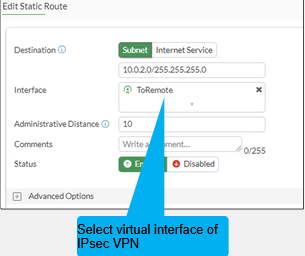
Static IP address / dynamic DNS
- static routes are needed
- Network -> Static Routes
Firewall Policies for IPsec VPNs
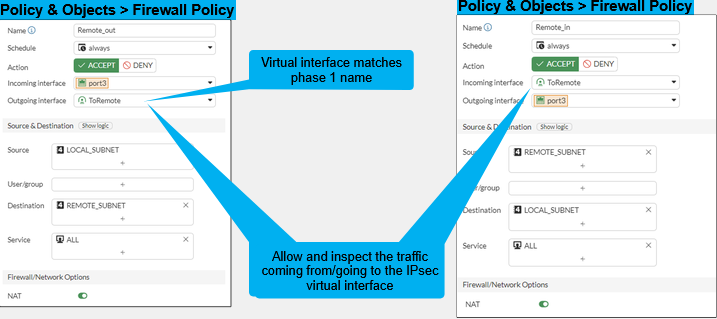
- At least one firewall policy is needed for a tunnel to come up
- Usually two firewall policies are configured for every tunnel
- An incoming, an outgoing
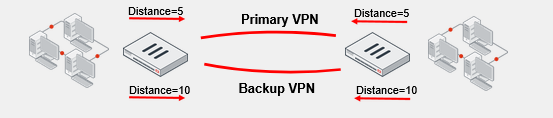
Redundant VPNs
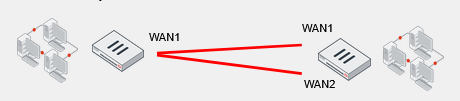
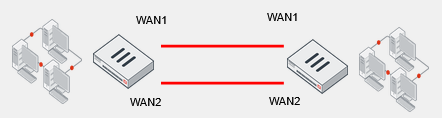
- If the primary VPN tunnel fails, FortiGate then routes traffic through the backup VPN
- Partially redundant: one peer has two connections
- Fully redundant: both peers have two connections
Redundant VPN Configuration
- Add one phase 1 configuration for each tunnel. You should enable DPD on both ends
- Add at least one phase 2 definition for each phase 1
- Add one static route for each path
- Use distance or priority to select primary routes over backup routes
- Alternatively, use dynamic routing
- Configure firewall policies for each IPsec interface
IPsec VPN Status - IPsec Monitor Widget
- Monitor IPsec VPN tunnels
- Display status and statistics
- Bring up or down VPNs
- Dashboard -> Network -> IPsec
Monitor IPsec Routes
- IPsec routes appear in the routing table after:
- Phase 1 comes up, if the remote gateway is set to a static IP address or dynamic DNS
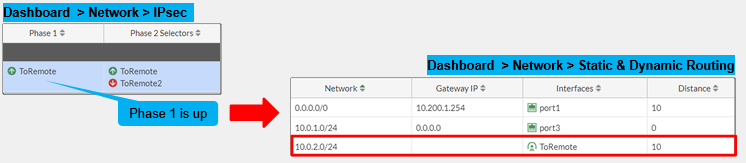
- Phase 2 comes up, if the remote gateway is set to dial-up user

IPsec Logs
- Log & Report -> System Events -> VPN Events
IPsec SA Management
diagnose vpn tunnel ?
down - shut down tunnel
up - activate tunnel
list - list all tunnel
flush - flush tunnel SAs
IPsec SA
diagnose vpn tunnel list name Hub2Spoke1
This will show;
- DPD information
- If anti-replay is enabled
- SA information
- Hardware offload information
IPsec Tunnel Details
get vpn ipsec tunnel details
Shows:
- phase 1 details
- Quick mode selectors
- Tunnel MTU
- Phase 2 SAs for each direction
- Hardware acceleration
IKE Gateway List
diagnose vpn ike gateway list name Hub2Spoke1
Shows:
- When phase 1 was created
- Is this gateway an initiator or responder
Clear phase 1:
diagnose vpn ike gateway clear <name>
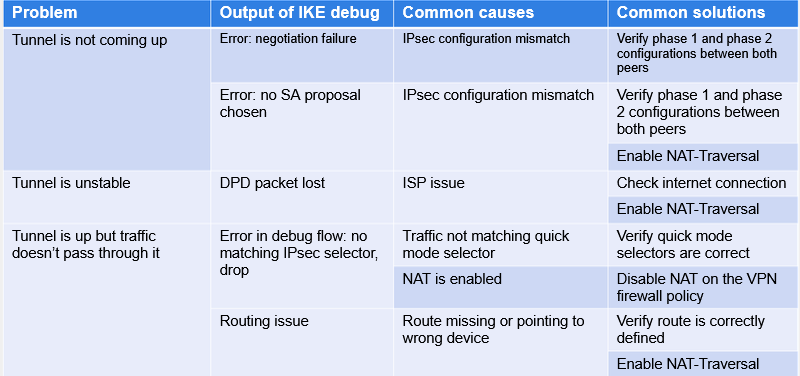
Common IPsec Problems